
Know the dog. Know the day.
A familiar face at the door is lovely. Remembering which shampoo, which service and which dog dislikes the dryer is a bit more of a job. Keeping useful client and pet records with your grooming diary means you can check the details instead of relying on memory.
LeadFetch brings customer details, pet records, care notes, appointments, payment records and conversations together. Here is a practical way to use those details before, during and after a visit.
On this page
What belongs in a dog grooming client record?
Start with the details you need to arrange and carry out the groom: the customer's name and contact route, the right pet, the service being discussed and relevant coat, handling and care notes. Record useful facts in plain language that will make sense when you read them again in six weeks.
Keep owner and pet details distinct. A phone number belongs to the customer; a note about a nervous dryer response belongs to the dog. Where a customer has more than one pet, check that you have opened the right record before adding a note or agreeing a visit.
- Customer contact details and how to reach them about the appointment.
- The dog's name, breed or type, and relevant coat and handling needs.
- The agreed service, appointment time and price.
- Useful notes from the visit and anything agreed for next time.
Check the record before agreeing a slot
Two full grooms can take very different amounts of time. Read the dog's details and the customer's request before agreeing the service, price and length of appointment. Leave room for preparation, clean-up and the care that particular dog needs.
If something is unclear, ask the customer. An old note is a starting point for a conversation, not proof that nothing has changed. You keep the decision about suitability and what your salon can safely offer.
Let your diary show the day you can actually work
Set working hours that reflect when you can take appointments, then review the calendar before offering a time. Account for existing visits and the length of the groom, rather than fitting every dog into the same-sized gap.
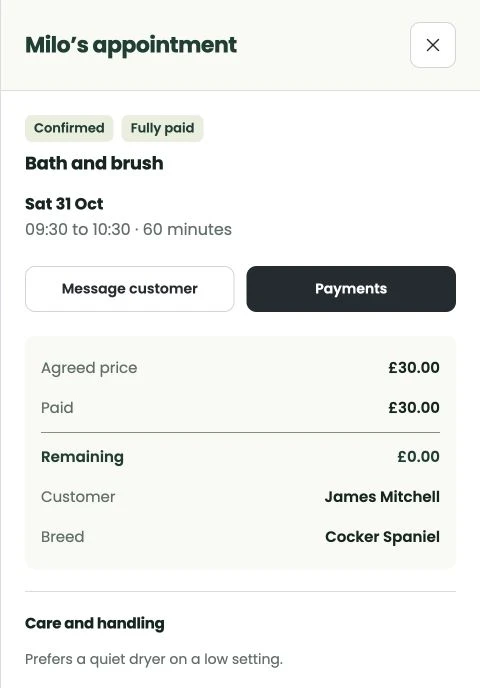
Open the appointment to check the pet, customer, service, agreed price and payment summary together. If the time or service changes, keep the appointment record up to date so your diary and the customer's understanding stay in step.
Write notes that help at the next visit
After the groom, note the useful things you would otherwise have to rediscover: the coat condition, handling that helped, the finish agreed with the customer, and any change to discuss next time. Keep it factual, respectful and relevant to the service.
For example: 'Owner asked for a longer tail. Settled better with a quieter dryer. Allow extra time to discuss the coat at the next visit.' That is more useful than a vague reminder to yourself that it was a difficult afternoon.
Do not put card numbers or unrelated personal information into pet notes. Stripe handles card details for online payments and saved-card protection.
Make repeat visits easier without making assumptions
Use the existing customer and pet details as a starting point when someone returns. Confirm the right dog, the requested service and whether anything relevant has changed. Reusing a record saves retyping; it does not replace the conversation.
Review what was agreed last time before setting a new price or time. A previous appointment is useful history, not a promise that every future groom will cost the same or fit the same slot.
Keep contact choices clear
Make appointment messages useful: the right visit, date, time and next step if plans change. Keep replies with the conversation, then review a request to move a visit before treating it as a confirmed replacement.
Appointment updates and promotional availability messages are different. A customer's preferred way to be contacted is not permission to send every kind of message. WhatsApp availability offers are for customers who have opted in.
Start with the next working day
You do not need to turn this into an evening of rewriting every note you have ever made. Start with the appointments coming up: check that each has the right customer and pet, a realistic time, an agreed service and the details you need.
If you need help getting your salon organised in LeadFetch, contact Scott directly. The setup guide has a printable checklist, and the pricing page explains the £19.99 monthly plan and what is included.
Bring your bookings into one place
Set up LeadFetch around the way your grooming salon works.
Try LeadFetch