
Get your grooming salon ready for online bookings
Set up your business details, services and working hours, then review your booking page before sharing it with customers. LeadFetch brings booking requests, your diary, customer and pet records, and conversations together while you keep control of the final booking decision.
This walkthrough is for independent dog groomers preparing to use LeadFetch. Use the free setup checklist to work through the practical decisions for your own salon.
On this page
Start with your business and contact details
Create your LeadFetch account, then work through Your booking setup in the app. The setup guide covers your name, business and contact details, services and prices, working hours, and your booking page.
Use the business name customers recognise and check the contact method they should use. Decide who will review new requests and customer replies, so an enquiry has a clear next step when it arrives.
Add services, prices and working hours
In Services and prices, add the work customers can ask for, the price and the appointment duration. Choose which services appear on your booking page. Allow for preparation or clean-up time where your service needs it.
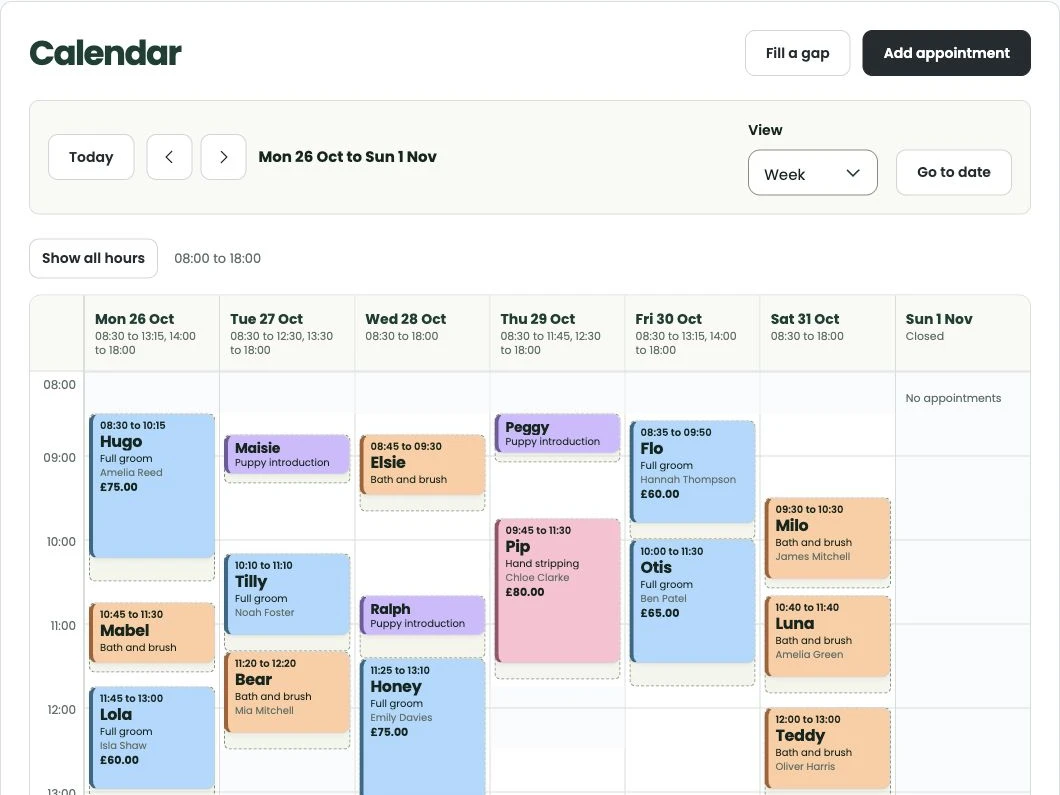
Then review Working hours and the diary. Opening a space in the calendar does not tell you whether a dog or service is a suitable fit. Think about coat condition, handling needs and the time you will need before deciding which appointment to offer.
Keep your service descriptions practical. A customer should understand what they are requesting and what you may need to discuss before agreeing the work.
Choose how deposits and card-on-file work
Payment choices are available in Settings. With Stripe connected, LeadFetch supports online payments or deposits and keeping a card on file. Review the payment and cancellation terms you want customers to see before relying on those features.
Check the amount or authorisation requested from the customer and when it is needed in your booking process. Card details are collected by Stripe. A saved card does not guarantee that a later payment will succeed, and a payment step alone is not confirmation of an appointment.
Make your next step clear: whether you still need to review the request, discuss the dog or service, or confirm the agreed appointment. The booking-request walkthrough explains that distinction in more detail.
Read more about deposits, saved cards and cancellation protection.
Review confirmations, reminders and replies
Email supports booking confirmations, reminders, appointment changes and customer replies. Review the message arrangements you intend to use and keep conversations connected to the appointment, so you can refer back to what was agreed.
WhatsApp is optional. Before relying on it, check that your connection is ready and that the message type and customer permissions support what you want to send. Availability messages are for customers who have opted in. Customers can use the booking system without WhatsApp.
If you enable booking assistance, it helps customers organise details and find answers you have approved. It does not decide suitability, set prices, confirm appointments or take payments.
See how confirmations, reminders and optional WhatsApp updates fit together.
Salon booking setup checklist
A practical checklist for independent dog groomers preparing to take online booking requests with LeadFetch. Download the one-page PDF to print and work through, or read the same checks below.
Download the setup checklist (PDF)
Business and contact
- Add your business name and the contact details customers should use.
- Check your own account name and the details shown on your booking page.
- Decide who will review new requests and customer replies.
Services and prices
- Add service names, prices and appointment durations.
- Allow the preparation or clean-up time each service needs.
- Choose which services customers can request online.
Working hours and diary
- Set working hours that reflect when you can take appointments.
- Review the diary and any existing commitments before sharing availability.
- Decide which requests need a conversation before you offer a time.
Payment choices
- Connect Stripe before relying on online payments or saved cards.
- Review your deposit, payment and cancellation choices.
- Check what the customer will be asked to pay or authorise.
Messages and confirmation
- Review email confirmations, reminders and reply arrangements.
- If using WhatsApp, check the connection and relevant customer permissions.
- Make the difference between a request and a confirmed appointment clear.
Review before sharing
- Preview the booking page and read the service and contact details.
- Review the information you need about each dog before accepting a request.
- Publish your booking page when ready, then share its link with customers.
You decide suitability, pricing, availability and final confirmation. A payment step alone is not booking confirmation. A saved card does not guarantee that a later payment will succeed.
Bring your bookings into one place
Start with your salon's details and build a booking setup that works for your day.
Try LeadFetch